AI meal scanner and tracker for everyday nutrition logging
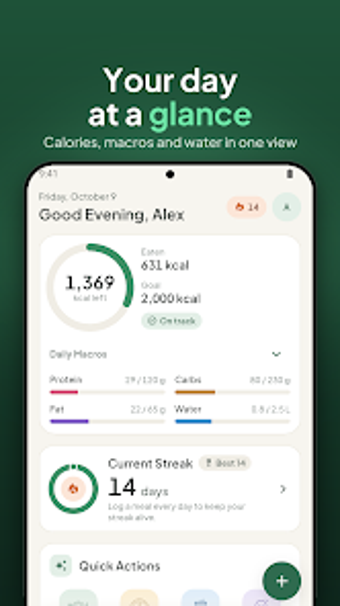
Scan a plated meal with your camera to get an instant calorie and macro estimate, or type ingredients for a quick breakdown. BiteBot, from Muhammad Azhar Tahir, is an Android health app that combines photo-based AI estimates and text entry. The app shows a daily progress ring for calories, macros, and water, offers AI recipe suggestions, and supports 21 languages. It fits health-conscious users who want low-friction, device-local food tracking during daily meals.
How BiteBot turns a photo into meal data in seconds
Photo-first logging is central: the app's AI Scan Meal estimates calories and macros from a taken or chosen photo, and Quick Nutrition accepts typed meals or ingredients for fast breakdowns. In practical use, this means you can record breakfast at the table or type a packed lunch in moments, reducing the friction of manual portion lookup while still capturing basic nutritional totals.
How the app works across languages and day-to-day routines
Multilingual support helps the app slot into varied daily contexts: BiteBot is available in 21 languages, including English, Arabic, Chinese, and Spanish, so meal names and suggestions match local usage. The Daily Progress Ring visualizes calories, protein, carbs, fat, and water across the day, which helps users check midday intake at a glance during a commute or work break.
Privacy, hydration tracking, and suggested meal ideas for continuity
On-device data storage and an account-free setup mean body statistics remain on the device, which affects how you set up the app at first use. Hydration Tracking logs water alongside meals, and Smart Suggestions generate recipe ideas and meal plans based on calorie goals, offering a next-step when users want meal variation without rebuilding entries from scratch.
To sum up, BiteBot helps consistent trackers with low-friction logging
For people who want to record what they eat without long lookup sessions, BiteBot provides quick photo or text entry, localized language support, and on-device storage that keeps setup simple. It suits weekday meal routines and short check-ins; less suitable if you need exportable, multi-device syncing. Pro tip: enable daily reminders and use the progress ring at mealtimes to keep tracking consistent.